
Showing posts with label GooglePlay. Show all posts

Thursday, August 7, 2014

The "News" in Self-Publishing is all DIY, not "done-for-you".

Self-Publishing is the new model which is far more profitable than traditional-publishing lock-step hobbles.
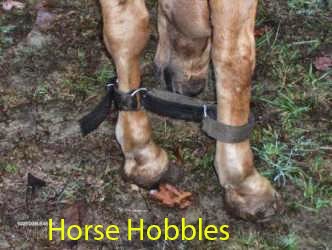

Quit being hobbled by traditional publishing - self-publish your books and earn more income.
(photo: eXtensionHorses)
Hobbles are used on animals to keep them from wandering. They're usually put on the (front) feet and are uncomfortable.

The model for traditional (legacy) publishing similarly limited the independent author, in many ways.

Because books had to be printed before they were sold, and the only profit was in huge print-runs, only a few books could be selected which would seem to be able to pay back at least the cost of printing. Statistically, about 1 in 10 of the publisher's selections would pay enough to cover the losses from the other 9, plus make a profit.

With Print-on-demand, and ebooks, this model is completely reversed.

Now the market decides what is a good book and what will sell.

I recently ran into this with Amazon. My trade paperback version of an ebook I edited together was being promoted as "only 5 left!" But what they didn't say is that they'd order another short run if they needed, and a larger run if it sold well. Because the book was only printed on demand, not in advance.

eBooks, of course, aren't "printed" at all - so it's a classic way to earn income without having to spend much more than a few hours of your own time.

This is what is the new "news" in publishing. When you get a traditional publisher, you are just tapping into their ability to set up a better cover, better proofing, and whatever existing distribution lines they have, plus promotion deals they might set up.

Frankly, the argument by Mark Coker of Smashwords and Marc Lefebvre of Kobo is that the indie authors do better pricing low and simply cranking out volumes of books in series (plus writing really long books.)

The surprising news is that the ebook distributors will take care of marketing your book with their own on-site algorithms. Each new book has it's limited time in the sun - after that, it's sales will depend on how well it was written.

Series of works come in when the reader wants to hear more about this character's adventures. Non-fiction books can be bundles of several different authors (such as the Masters of Marketing Secrets series - about copywriting.)

Let the market decide - don't second-guess.

One fact which showed up in the recent studies about copywriting is the common "conventional wisdom" that you can "create demand" for any product or service. Gene Schwartz was clearest in his "Breakthrough Advertising" (long out of print) where he stated that desires are eternal - you simply align your product to the most powerful desire you can. There is no such thing as creating demand. Demand already exists, depending on the maturity of the market and how many also-rans are present (ie. "competition").

Your marketing (copywriting) only aligns the perception of your product with an existing desire (demand). The better your copywriting/marketing, the greater the "discovery" - and the better your product, the more a user/viewer/consumer will tell others how it helped them.

That is really the core of how marketing works.

Is there any real need for traditional publishing any more?

Probably not.

I'd say that there is a need for marketers who can create campaigns to launch new books and re-launch book series, that these small companies could provide the service of publishing an author's books for them.

Those companies don't even have to be physically located in New York on Publishing Row.  They don't even have to be located in a city or town. They don't need much for office space (a spare bedroom or den will do.)

They do have to build an online presence, but their growth is more dependent on their quality of delivery than any physical condition of existence.

Practically, a well-run publishing business can run rings around any of the "Big Five" publishers, because they simply don't have the overhead.

How and Where to Publish as a SOHO Publisher

(Small Office/Home Office - as different from Lower Manhattan)

Rather than where you're located (physical), it's where you publish (virtual.)

The "Amazon-centric" strategy is using their KDP-exclusivity, backed by a hardcopy version (which would be Create-Space) and an Audible (exclusive) audiobook - all having the same cover. This is putting all your eggs in one basket, but has the highest profits possible (providing you can get your book to sell at all.)

The "Everywhere else, also" strategy says to get your ebook up on iTunes, Nook, GooglePlay, and Kobo, while matching this with a Lulu paperback and an Audible audiobook. You are still on Amazon, just not exclusively.

The "And Then Some" strategy has you branching out with bundles which you offer on affiliate sales platforms. In this case, you offer digital versions of the entire series, plus audiobooks (you are now not exclusively on Audible, or create a different version just for these.) This also has you getting accepted by OverDrive as part of their Content Reserve program - which can push you into libraries and other retailers where Amazon might not be as welcome.

Note: the SOHO publisher, with dozens, if not hundreds of titles to publish, can leverage the OverDrive connection - which a self-published indie author and his handful of titles cannot. The SOHO publisher also has the economies of scale - having already published that many titles, it's relatively easy to publish the half-dozen books an indie author will bring their way.

How a SOHO publisher is profitable

In any Gold Rush, the people who made the most money sold picks, shovels, pans, and jeans to the miners. You have to realize in publishing that most books don't sell well, if at all. Period. Striking a good vein is more than luck - it's hard work that the author has to do in honing his craft. Good books continue to sell well. Poor books fill up Amazon's database.

For a writer to make it with original works, they have to stick at writing for a few years, and concentrate on simply creating the best possible books they can. Amanda Hocking became a million-selling (and millionaire) author after she had already written 17 books and started self-publishing. Once she got popular, she got a traditional publishing contract which allowed her to concentrate on just writing.

What an indie author needs is someone who will publish their books for them, and take a piece of the royalties for a certain time period (say, 5 years) with a low up-front fee to cover costs. The SOHO publisher then is interested in the various marketing campaigns (again, mostly online) which will then get that book to sell.

The author doesn't have to worry about sales. They need to concentrate on their day job to pay their bills, while spending all their free time in writing and improving their craft.  They hire the SOHO publisher to do the background work of publishing (proofing, cover, pushing to distributors, creating bundles) so that author can simply concentrate on the two things they need to worry about.

Once their books start to sell enough to support their lifestyle, then the author can renegotiate the contract for royalties. Where the SOHO publisher is doing their job well, they'll keep that contract going and be able to concentrate more effort into expanding whatever marketing they have going to further increase sales. Win for the indie author, win for the indie SOHO publisher.

The SOHO publisher is affordable, as they take a much smaller percentage of royalties than the traditional publishers have. The author would end up with probably about 50% - 60%, compared to about 25-30% in the traditional-legacy publishing scene.

What's missing is the advance on royalty. (Like the $15 million Hillary just got which the publisher is preparing to write off as a loss.)

The indie author pays someone else to do the self-publishing work he/she could be doing on their own. Getting a SOHO publisher to take that drudgery off their lines would enable them to concentrate just on writing.

How this is better than Vanity Publishing

The old days (and these slick operators still exist) had the author shelling out a small fortune and would wind up with a stack of books delivered to their home which they then had to sell. Thoreau did this, but also Wil Wheaton caught this bug.

The modern days says you go virtual. Get print-on-demand for your print books, while the ebook is out there forever. Invest the profits from these into producing an audiobook and leverage your original content into greater income.

The author in this case pays someone to line up proofing and cover artwork, then to do the detailed work of publishing to the various online distributors. As well, the author doesn't have to learn how to publish their own book, or how to market online - but simply can keep to the craft and job of writing.

Vanity publishing gave you a stack of books. SOHO publishing gives the author more freedom to be creative.

The vanity publisher was paid for short-run publishing. The SOHO publisher is paid for the effectiveness of knowing and executing online marketing.

Of the two, the SOHO publisher has less overhead and so a much greater opportunity for profit. Entry-level costs are much lower than any vanity press, but with the right contract, will then be able to ensure future profits while being creative in a different realm of marketing.

Your choice, as always. Stay hobbled or get free to roam.

How to get more information

I operate my own home-publishing business. I don't take new clients currently. But you can learn how to publish on your own (or learn what your publisher should know) with my book:

Publish. Profit. Independence.

Home pubilshing business guide - earn extra income and financial freedom by publishing on your own.
Available everywhere fine books are sold. ( More links coming soon...)

And do sign up on the upper right so you get the latest installments of this blog.

Wednesday, July 2, 2014

Falling in Love with Leanpub for Self-Publishing Ease

I Love Leanpub For Making It Easy to Self Publish eBooks

It's now so easy to self-publish via Leanpub that I've fallen in love all over again.

Half tongue-in-cheek and half in earnest - when I moved to publishing my latest set of books on copywriting to Leanpub, the ease of editing and proofing made me re-think the way I had done it before.

If you're following this blog, you know that I already have recommended moving Leanpub to the beginning of the queue when self-publishing your latest masterpiece.

Then I started using this in earnest, testing it with a dozen books. The great part is that the Leanpub learning curve is so short.

Here's my current operating basis:
  1. All my books are cobbled together in LibreOffice. I do the rough-edits in a text editor, then import and work it up in LibreOffice Writer to get a WYSIWYG approach and a view of what it's going to look like. Earlier, I'd port via Writer2Epub to epub, then edit and correct with both Calibre's built-in editor and Sigil (they each have different functions and complement each other.)
  2. Then I save as HTML and import into Leanpub. I use the Dropbox connection, so it updates the files on my own machine every time I generate a new preview.
  3. Proofing is simple - you just edit the converted file with a text editor, using Markdown (which is extremely easy to learn.) Then save - and it's auto-updated via Dropbox. Hit the Preview button again, and use the PDF to see how it's going to look. (I set it up for viewing dual pages at 100% on a 22" monitor.)
  4. After a few iterations, I can then hit "Publish" and have the finished version.
  5. Now I can combine that latest book with earlier ones and so have a bundle for sale. They even encourage you to create a video which they will pull in from YouTube or Vimeo and feature for you.
  6. Then you have a base set of files for porting to the distributors.

The improvements are vast.
  • You don't have a great choice of margins or fonts with their PDF. And you have to settle for justified text as well. But it turns out looking great. (One trick is to have your Chapters as Heading 1, so they become the titles in the header - otherwise, you can have the parts as H1, and the chapters as H2.)
  • Your epub already passes epubcheck, so is ready to distribute as-is. (One drawback is that the epub, mobi, and PDF files are all branded with Leanpub links and logo - so porting these to other distributors probably means you'll need to remove these with Sigil, or Adobe Acrobat Pro.)
  • You're starting out with three versions, binders, packages, plus extra's you can add yourself to make the Leanpub version outstanding.
  • You also have a built-in affiliate program which pays 50% commissions (compared to the industry range of 7-8%.) So your readers can get rewarded for becoming evangelists.
  • You can email your readers from Leanpub to let them know of any changes or upcoming new releases.

In short, this is THE WAY to start your publishing. Period. (They'll also import from Wattpad, if you've already got a following there.)

Once you have this all done here, you have the basics for porting it to the other 6 or 7 main distributors.

Self-Publishing Sequence

Your sequence would then be
  1. Lulu next, for the free ISBN and also to produce the print version. (You can edit the PDF as well as the epub file.)
  2. Then Amazon. Having your print book ready at the time (or close) when you post your ebook will boost sales. (But regardless of that, you can crank out porting your ebooks everywhere meanwhile.)
  3. Next would be iTunes, Nook, Google Play.
  4. Then Kobo.

And of course, you store the data into Calibre as you develop it.

The marketing begins at that point. When you have a video at the outset (or you can do it now), you'll be way ahead. Podcasts would then be available.

You also put up an opt-in form with an ecourse. Those PDF's also go to the doc-sharing sites.

About now, you set up your release-launch sequence. A series of video's could also be excerpted for video sites, as well as added as extras on Leanpub and also iAmplify - where you could get extra income.

Note that you can fire up your Affiliates on both Leanpub and iAmplify as part of your launch.

If you want the more data on book launches and publishing, get this bundle...

I wrote up the research on running a book launch in the latest update of "Just Publish! Ebook Creation for Indie Authors" - while it's full implementation into an ongoing publishing strategy (using Leanpub and 6 other main distributors) is found in "Publish. Profit. Independence."

These two are bundled together on Leanpub just for you. Contact me via Leanpub and let me know what you think.

(As below, my earlier books and bundles have been removed from Leanpub as I published too many (more than zero) public domain books there. Until I can get these up on other platforms, the links are gone.)

- - - -

Update: Getting Leanpub into the production line-up has improved quality and speed. Proofing is much faster and easier with PDF previews and Markdown editing with simple text editor. The file Leanpub produces is already epubchecked, so there isn't any need to export via a Writer2Epub plug-in and then using Sigil and Calibre editor to clean it up. Much less complicated.

This strategy as laid out has proven itself. Nice to have a test succeed.

Update 2: Leanpub suspended me for "copyright violations" (public domain books.) Love affair is definitely over. Warning: Do original works only there.

Friday, June 27, 2014

Update: How Lulu Distributes Your eBook - on a Lag

Something funny with Lulu - why the delay in distribution?

Lulu delays distribution of ebooks as an aggregator - are they worth your royalties?
(Photo: RainbowCave)

Lulu has now started e-mailing when they actually ship your book to the main distributors (iTunes, Nook, Amazon, Kobo.) Nice. But why does it take so long?
"Congratulations!  Your eBook, “[book name goes here]”, meets all retail distribution requirements and we have forwarded it to the retail distributors you selected. 
"...  Important Note: Generally, once your book passes the Lulu Review process, it will be available to purchase on retailer sites in 2-4 weeks. Retailers update their online catalogs at intervals determined solely by the retailers. Lulu cannot provide a release schedule nor can we influence the timing of your eBook’s availability on other retail sites."
On the other hand, given a direct upload to iTunes and Nook, your ebook goes live in 24 hours. Amazon and Nook have a similar lag.

But it's not 2-3 weeks on top of whatever delay (in weeks) that Lulu takes to process your book through their own filters. (In this case, I had to remove the term "Smashwords" and any link to it.)

Now, with my MAC, I send directly to iTunes (and anywhere else) without any delay such as this.

Meanwhile, I don't have to pay an aggegrator 10% of my royalties with all the delays.

The Lulu interface is also limiting - only 1,000 characters to market your book (while the rest are somewhere between 4-5,000 characters) and only a miserable few categories to prove your place in their "related" algorithms. Google Play, iTunes and Nook use true BISAC categories. Amazon and Kobo have their own versions of this, as does Leanpub (who is even more limited than Lulu.)

Note that Smashwords is on a similar footing - limited characters and categories. As well, they have month-long delays in shipping your book to distributors. Meanwhile, they take around 15% of your income.

The question then becomes: Are aggregators worth it?

In all cases, they charge for their services. The best of the best (lowest cost and best distribution) are Lulu and Smashwords. The rest are much higher priced and can be, quite frankly, "rip-offs."

What do you gain by using an aggregator?

Time = money.

The independent writer, who is posting his own work, this is probably a good deal. And the reason I stick with Lulu is as this enables the indie author to get their books published as print-on-demand (POD). And having printed books up with ebooks make both sell better.

The platform this provides gives the freedom and time to just keep writing. And writing is what brings in income for any author - not spending time at anything else (including marketing.)

Spending time publishing isn't in the best interest of the indie writer - who wants to make a living from publishing their own works.

BUT - the indie publisher sees things differently.

The depth of any backbench is the predictor of income.

The more books you publish, the higher income you can earn.

It's all dependent on the value you offer and deliver. The indie publisher is constantly looking for more authors with books which people want. Finding existing market niches and servicing these with valuable materials (books, videos, podcasts, whitepapers, manifestos, etc.) is the core business plan for such.

Profit runs business decisions. Speed of execution, time to market - these result in more profit.
Having to wait a month or two to get a product to market (and having no control over when such a product actually arrives) could mean missing relatively short buying seasons such as Christmas, Black Friday, and Halloween. Or longer buying seasons such as spring (gardening) and summer (vacations).

Books have seasonal buying patterns. These can be discovered and strengthened with promotion to increase sales and lengthen their sales duration.

This means that a self-publishing home-business is better to invest the extra time in simply publishing their books (and materials) directly. The offset in time used to directly publish is paid back in almost precise control of delivery and sales.

As well, the added analytics each individual distributor gives can allow you to tailor-make your promotion campaigns to fit those which result in greater sales. For instance, I have multiple PLR books which sell better on Google Play than elsewhere - as they are keyword-relevant to Internet Marketing niche. Certain public domain fiction authors do better on iTunes than elsewhere. iTunes also has certain extras such as discount coupons and pre-sales which could be a targeted campaign that would raise a single book or series by high-selling authors - and so raise more sales of related books.

Another point is where a book comes out which has recently been made into a movie. "12 Years a Slave" was originally a public domain book which started selling better once that movie came out. The Koran also started selling better after 9/11 (as a morbid example.) Current news discussions of Doye's "Sherlock Holmes" series now being in the public domain - as well as the multiple Sherlock Holmes movies that have been created over the last few years - would then prompt more sales (especially if these were linked with promotion pointing to the sites where your versions of these public domain books can be purchased.

A site with PLR and PD books on gardening, which was launched in late December, then promoted in January and February could get more traction. A collection of Gothic tales published and promoted in time for Halloween could bring sizable profits. Then a re-launch each season would spike sales again annually.

Conclusions:

  1. The indie author, with just their own brand, should use Lulu to carry their water. This frees them to get back to writing their next book.
  2. The indie publisher should always do their own aggregation, as the savings and profit potential are much greater. This frees them to find more market-niches and publish books people will buy.

https://leanpub.com/publishprofitindependencebetaPS. How to publish from home - "Publish. Profit. Independence." is now live on Leanpub and available for purchase. Get Your Copy Today!

Tuesday, June 17, 2014

A Comparison of Distributors – Who's on First?

Figured I owed you a no-holds-barred, warts-and-all review of the main distributors - from my experiences with them.

The aggregators all charge something to post your ebook to the various distributors. Lulu is the cheapest, at 10%, Smashwords at around 15%. Everywhere else is a lot more.  Some are outright rip-offs preying on the naive. I include Lulu and Smashwords below, the rest are distributors.

Lulu

While I recommend them highly (way above and ahead of Amazon's CreateSpace) it is really because of how I originally got in with them through Print On Demand (POD) books. They got me into ebooks when they started porting epubs to iTunes and Nook. So I started taking all my books and ported them through Lulu to see what would happen. When they started selling - more than Amazon - I was hooked.

What they've done recently is to clamp down on public domain ebooks. Which put a damper on my business plan. They simply won't distribute them anymore. They'll ship PLR, but not PD books.

That doesn't affect local Lulu ebooks, or hardcopies they print. And that is their main use again - printing books which independent book sellers will stock that don't have the Amazon imprint (Createspace). The other great point is to be able to create low-cost hardcopy books which are available as a special enticement for your paid membership clients.

Lulu has a small community. It has generated few sales for me - and probably most of these were from linking my own pages there.

Smashwords

Frankly, too hard to use. I just don't have the time to work up a working template and then port a special version to them. While they now accept epubs, you still have to edit that file just for them.


They won't take PD or PLR books (and will pointedly ban you if you try.) So they are out of my business plan, except for my own books.

If you do put your book up on Smashwords, it's a separate version and will be up there with any other version you have there. Amazon doesn't easily take up Smashwords books, so you won't see them much there. Like Lulu, they will now ship everywhere. Lulu actually gets accepted by Amazon, so they have a leg up over Smashwords (particularly as they are much more easily accessed.

Smashwords generate multiple versions of your original ebook, much as Leanpub does now.

They do have an active community, but I haven't used them much. Certainly I've had few sales here - as I only have 2 books there.

Amazon

A lot has been written about the, as the 900-pound godzilla in the room. Only the presence of other distributors has forced them to improve their royalties for indie publishers. They still stick it to you with added "upload" fees.

I've no love lost with them. Get some of the books on how to game their system - most of them work, or did. Amazon adjusts their algorithms regularly, just as Google does. Once you do hit the "big time" then you'll get a lot of sales, since Amazon has something around 50% of the total ebooks sold internationally. That share has been declining and there is no really accurate measurement of market share for any distributor (since none disclose their actual sales.)

Amazon is easy to upload to, and they take epubs.

Kobo

Not bad. They go more places internationally than Amazon or anyone else. They do only ebooks. Originally Canadian, they were bought by Rakuten and have been expanding. They have special arrangements with the ABA and indie publishers to sell their ebooks and ereaders locally in the U.S. A win-win for all concerned.

My recent problem with PD books came up when a supervisor there said I had to either declare them as PD and take a "standard" (their words) 20% royalty. PLR isn't subject to those.

Still, it's not my best income source.

iTunes

I've only recently begun accessing this directly. Most of my books were earlier submitted via Lulu, so I don't have a great deal of data at this point. iTunes has produced the greatest income outside of having a bestseller on Amazon.

Submitting is simple if you have a MAC. A simple approach is to get a MAC mini.

Practically, a MAC will give you all you need for posting to any platform. If you're doing a lot of public domain books, then you don't really have an option to not post directly to iTunes.

Publishing directly is much faster than waiting 4-6 weeks for Lulu to process your files. You are also able to enter a much greater amount of meta-data, so your book can be found easier through the "related" algorithms.

Nook

Most problematical. Most of my experience was via Lulu, so I'm just getting up to speed here. However, my first test with an epubcheck-passed file required additional editing before it was accepted. (It had passed through Lulu, which normally means it's fine.) 

The other problem was some sort of javascript framework deal where I couldn't get in for a week. This might have been a low bandwidth problem or a ping-delay due to my satellite provider. Their forums noted access problems a year ago.

Nook gives me some of the lowest income. On Lulu, the sales reports are slowed by a month. Direct posting should give me immediate data, as it's part of their interface. Hopefully, this will give me clues as to how to improve it.

Direct access also gives you better meta-data posting options. We'll see.

Google Play

Decent income for me. Even though their royalties are only around 52% on average (some changes when your price is at the low end, which all of the distributors do.

They also screw around with your price, arbitrarily dropping it around 20% - so watch this as Amazon will "meet" their price automatically.

Google imports reviews from other sites (like Amazon and Goodreads) just as part of providing data - they aren't review-centric like Amazon (which gets gamed regularly through that function.) 

They are simple to publish books, which facility only happened earlier in this last year. This integrates  your books with Google Books, and so is kind of actually two distributors in one.

It is simple to connect your print books with ebooks on Google Play (and iTunes, Nook) - and so then enable Google Book Search for the print work. This then enables greater SEO for your books. Other than Leanpub, this would be the single link to use if you only had one.

Google Play makes money off direct sales, but will take a percentage from sites which sell your hardcopy books.

Leanpub

This is the jumping off point now. As distributors, they give you a 90% royalty,  minus 50 cents - which keeps them in the black. The essential model is comparing a book to a start-up, positing that posting early and often allows your book greatest success - since you get user feedback immediately.

Elsewhere, I've done a much longer review of this distributor. If you can only give out one link, use this one. They create epub, mobi, and PDF versions of your book. They allow the reader to pay the amount they want - which can be much more than your stated minimum and maximum. (Actually they found a common payment to be $10.62, which was actually turned out to give the author a flat $10.00)

They have a built-in Affiliate program and the ability to create binders of related books on Leanpub, and packages of any digital materials.

Build your book there (they are said to have direct epub upload shortly) and then edit that ebook so you can post it elsewhere without their branding (or go ahead and keep it.)

Overdrive

Tests still ongoing. I've not been accepted as a publisher yet. Here, you are able to set wholesale and retail suggested prices. You are also able to post audiobooks here.

These reach different outlets than the rest, as they deal with libraries and colleges, as well as retail outlets.

I'll keep you posted as I get more data...

- - - -

That wraps it up. Posting here so I can get it into the book I'm wrapping up on this subject.

End of this book may mean also the end of this project as I move onto the next.

If I do find something, I'll post it here - so do subscribe in the way you'd like (above, right.)

Saturday, June 7, 2014

How to Post Your eBook to Multiple Distributors - Ease and Profit

Easy Profit can be made by self-publishing your ebooks to multiple distributors in an efficient sequence.
(photo: Blythe)

Sequence and Feeding of eBook Distributors - How to take it easy and make extra passive income meanwhile.

If you've been following this series of articles, you'll know that we are now up to about eight major distributors to use. As an Indie Publisher, it's key to ensure you make best use of your time, to be efficient and profitable. It's all investing time for money. Leveraging your time makes money. Simple.

With eight distributors, there are more than a few tricks on how to get the most bang for your buck. Unknown, you'll see these "Tips for Self-Publishing" where they tell you to just stick with Amazon, or only publish to Smashwords. That's where you're leaving money on the table. Until you get a routinely-good-selling book (or several) on Amazon, you'll need to get these other distributors stocked as well.

Note: You'll also note that distributing via Lulu or Smashwords isn't covered. Reason being that they don't allow public domain works to be published, plus you are paying them out of your royalties to distribute your books. If this is your current workflow, then adjust based on the below. 

Right now, the other 7 distributors give me about half of what I'm getting from Amazon with only one decent seller there. (And it's a 99-center.) When I started out, I was making four times as much from the other distributors as I did from Amazon, and that was enough to cover my monthly bills and quit working for anyone else.

Bottom line is that Amazon is a crap-shoot, and the regular sales you get from multiple other distributors will even things out for you. We're here to make enough profit to live on and then some. (Also known as "Financial Freedom.") Start by making money right off, and then build this up as you market your books and improve their discoverability.

The Lowest Common Denominator versus the Covers-All-Bases approach

As we build our ebook, and related versions, we want to work with the Lowest Common Denominator (LCD) which will be accepted everywhere. This is the epub format, once it's been properly "epubchecked" and verified.

In posting to distributors, in general you want to start with posting to the distributor which enables you to post the most meta-data possible - then record that meta-data so you have it for the rest. Meta-data is the details about your book which takes the longest to assemble - and is your key marketing steps to take as you publish.

By "covering all bases" with the distributors which allow the greatest possible meta-data included (better for search engine discovery), then you can gather all this material once and copy/paste to the remaining distributors - tweaking as you go. This leverages your time and makes the publishing cycle quicker.

(Caveat: My tests with Leanpub and OverDrive are still ongoing at this writing.)

A rough sequence would roll like this:
  1. Creation of your book on LibreOffice (since it will port to PDF and HTML directly.)
  2. Either create an epub with the Writer2Epub plug-in, or save as HTML and import to Leanpub for creation. On Leanpub, you'll simply publish it to get the epub file and then come back to fill in the meta-data.
  3. Start your publishing with Lulu in order to get the free ISBN. (While ISBN's aren't required by any ebook distributor I know of, they make it simpler to track.) You don't have to finish the Lulu publishing cycle as this point, just collect the ISBN.
  4. If you haven't already, open up Calibre and import your ebook. This is where you will input all your meta-data for later use. Note: create a custom meta-data input field for BISAC codes in Calibre. (Yes, I owe you a how-to article on this.) And I have created a spreadsheet for these you can access free.
  5. Open up Google Play (https://play.google.com/books/publish/) upload your ebook, and fill out everything there. Record that data into Calibre.
  6. Then post your book to iTunes and Nook, which are the next most data intensive.
  7. Amazon follows, and Kobo. Both of these have their own versions of BISAC for categories.
  8. Wrap up posting to Lulu and filling out your Leanpub data fully at this point. These two have the least meta-data to fill in.
  9. Then post to OverDrive, which has different pricing points to consider.
  10. Finally, update your ebook website with all these buy links, as well as Leanpub binders and packages.

That gives you an efficient work-flow with the fewest sets of back-stepping.

Notes:

  • Recording all your meta-data into Calibre makes copy/paste an actuality.
  • You'll start getting sales from Google and Kobo within days. Amazon probably won't rank you until you get some reviews. It may also take as long as a month or 6 weeks for your book to show up on iTunes and Nook. Almost all of these have a month delay from the time they make a sale until you can get paid for it. Nook has their statistics delayed by another month as well, so any attempt as a complete book sales analysis will always be tardy at best.
  • As it's best to do a print version as well, you might want to publish this first via Lulu and get your proof sent. Any meta-data you use here can go into Calibre and expanded on. That secondary ISBN will be useful on GooglePlay, iTunes, Nook, and Leanpub right off. Google, for one, will link to it for sales (they get a split of sales they send to the major booksellers.)
  • Affliliate links are available via Leanpub, so you can get your audience to sell these for you. 
  • One marketing strategy would be to set a publishing date farther in the future (once you are more certain it will be available on iTunes and Nook) so you can allow pre-orders on Amazon, Kobo, etc. Meanwhile, you can publish your book via Leanpub as you write it, which may finance your project, plus giving you vital audience feedback. You send out emails to your list so they can stay updated on your progress and will be able to post reviews on Amazon when it goes live. (The Amazon version is obviously discounted at first, just to get those paid reviews.) Note: Leanpub auto-publishes a .mobi version for Kindle ereaders. 
  • If you use Leanpub to compile your book and involve your audience, you can use Calibre to convert the resulting epub to an HTML or RTF file (importing to LibreOffice) to edit your print version PDF for Lulu.
  • Goodreads is anther way to get reviews ported to its owner Amazon 
  • If you are active on this platform, then post your pre-publication chapters there.
  • Always update your website when you generate anything with a new link. Search Engines love this.
  • Always get started on your next book once you've published your last one. Your audience will love you for that - send an email to your list when you do.
  • For serious publishers, this is best done in batches, especially for PLR or PD based books. Marketing for these is often based on what starts selling on its own - then you back this up with additional promotion which will goose the various sales algorithms a bit.
  • You can do all this on a MAC mini. Food for thought. 

Then what?

Now you can expand into the various online marketing campaigns. Video trailers, social media syndication, doc-sharing, all these online marketing approaches can be layered on this. Even buying traffic to your book's webpage via Stumbleupon.

The point of this is to enable you to get started with sales right off and not waste any time as you do. As you ramp up your marketing efforts, then your sales should respond as well. Eventually it takes off (or not.)

Your time marches on, regardless. Don't waste it - invest your time, leverage your time.
Enhanced by Zemanta

Sunday, April 6, 2014

How to Step by Step Publish on Google Play

GooglePlay just recently worked out a nice little sequence of steps - a checklist - you can follow to publish your books there. 


While this would have been nice to have at the outset, it's nice to have now.

footsteps to publishing on GooglePlay
(photo: Davide Mancini)
I've taken the liberty of scraping these pages for your (and my) reference down the line. A little easier than having to click through everything (IMHO, anyway.)


-->

How to sell a book on Google Play: a checklist

(See also their troubleshooter.)

Step 1. Create an account

To sell books on Google Play, you'll need to join the Google Books Partner Program. This will give you access to the Google Play Books Partner Center, where you can manage your book catalog and payment settings.
  1. Go to play.google.com/books/publish and either sign in using an existing Google Account, or create a new account.
  2. Provide account details and contact information, then click Continue.
  3. Review the Google Books Terms and Conditions and the Google Editions Addendum. If you accept these terms, indicate this with the appropriate selections.
  4. Click Continue.

Step 2. Set up your payment profile

You must have a payment profile in order to sell books on Google Play. The country listed in this payment profile will determine the currency you're paid in.
  1. Go to the Payment Center in your Partner Center account.
  2. Under Payment profiles, click Add a Payment Profile.
  3. Enter a profile name. We suggest indicating the country and currency for this payment profile.
  4. If you agree to the terms, continue by checking the box labeled I have read and accept these documents.
  5. Click the Complete Signup button.

Step 3. Specify a bank account

You can start selling books without providing details about your bank account -- Google will hold accrued funds from any sales. However, you'll need to specify a bank account in order to receive any sales revenue.
  1. Click the edit link next to the payment profile.
  2. Click the Add a new bank account or Add new form of payment button.
  3. Enter your bank account information.
  4. The box labeled Make this my selection for future payments is checked by default. Do not uncheck this box unless you're providing bank account settings that you don't wish to activate yet.
  5. Click the Save button.

Step 4. Add sales territories

Sales territories specify the countries where any of your books can be sold. For example, if one book can be sold in the U.S. and another book can be sold in Canada, your sales territories should include both countries (formatted as CA,US).
  1. In the Payment Center, under Sales territories, click the Add a Territory button.
  2. Select an existing payment profile. If you need to create a new payment profile, click Cancel and go to the the first step of this checklist. If the payment profile has been recently created and doesn't display in the drop-down list, try reloading the page.
  3. Enter the list of countries belonging to this sales territory, using two-letter ISO 3166-1 codes. (See our formatting guidelines.) If you can sell your books across all countries, an easy way to list them is to enter WORLD.
  4. Check the box labeled Enable this region configuration.
  5. If you're subject to fixed price laws in the above countries, check the box labeled I am subject to fixed pricing laws in these countries. This setting should apply to all countries in the sales territory. You can create additional sales territories if you need to apply different settings to different countries.
  6. Click Create Territory.

Step 5. Enable currency conversion (optional)

Google's currency conversion tool allows you to set prices in a currency you're familiar with, while buyers in other countries will see the price in their local currency. This isn't a required step, but it may make it easier for you to sell your books in more places.
  1. Scroll to the bottom of the Payment Center page.
  2. Under Currency Conversion, click the Turn on currency conversion for your catalog button.

Step 6. Tell us about your book

In this step, you only need to provide general details for the book, such as the title and author. We'll ask for additional settings in the next steps.
  1. In your Book Catalog, click the Add books button, then select Add Book.
  2. Enter the ISBN. You can enter either the 10-digit or 13-digit ISBN. If you don't have an ISBN for the book, check the box labeled This book doesn't have an ISBN or other identifier. Google will assign an internal identifier (prefixed with GGKEY) to your book.
  3. If you have multiple templates in your account, select the template with the default settings you'd like to apply to this book.
  4. Provide as much information as possible about the book on the General details page.

Step 7. Provide prices

We require a price in order to list your book on Google Play, even if you wish to make it available for free (in which case, please enter 0 as the value). Google will calculate your revenue share based on the list price you provide. There are three required components for a price:
  • the currency,
  • the numeric value,
  • and the countries where the price applies.
Google needs a price in the local currency for each country where you want to sell the book — for example, to sell in the U.S., you must either:
  • directly provide a price in U.S. dollars, or
  • have currency conversion enabled, and include the U.S. in the list of countries where a price in another currency should be applied.
You can provide multiple prices with different settings (such as different currencies) if necessary.
  1. Go to the Google Play settings for the book.
  2. Click the Add a new price button.
  3. Click Currency to enter the currency, formatted as a three-letter ISO 4217 code (e.g., USD for U.S. dollars).
  4. Click Price to enter the numeric price.
  5. Click Countries to enter the countries where you'd like this price to apply, formatted according to our guidelines.
    • If you've enabled currency conversion (see Step 4), you can list countries that use a different currency than the one you specified or use the keyword WORLD to indicate all your sales territories. Your converted prices will be based on your list price.
    • If you're not using the currency conversion tool, you should provide separate list prices in the local currency for each country where you wish to sell the book.

Step 8. Configure distribution settings

Additional Google Play settings allow you to control the availability of your book.
  1. If the book shouldn't be available for sale until a specific date in the future, enter the date in the On Sale Date field. Use the format YYYY-MM-DD.
  2. If you want to apply Digital Rights Management (DRM) to your book, check the box labeled DRM Enabled.
  3. If you have the rights to include images in the eBook, check the box labeled Show Photos in eBook. If a book contains a significant number of images, we can sell it only if this box is checked or if we receive an ePub file.
  4. If you wish to sell the book in PDF format, check the box labeled Include Scanned Pages.
  5. Select the maximum allowable percentage of the book that buyers can copy and paste in the Copy / Paste Percentage field.

Step 9. Configure preview settings

Books available for sale on Google Play are also included in the Google Books index. Google Books settings apply to the preview of the book.
  1. You can change the percentage of the book that can be previewed on Google Books with the Preview Type drop-down.
  2. Make sure your preview territories are formatted correctly and include any sales territories (see Step 4).
  3. If you sell your book directly on your own website, you may want to include a Buy link; the Buy Link Text should be the name of your website and the Buy Link is the URL for purchasing this specific book.
  4. Enter your website homepage URL as the Publisher Website.
  5. If you have a logo, you can upload it as the Publisher Logo.
  6. If you have the rights to show images in the book preview, check the box labeled Show Photos in Preview.
  7. If you set the preview percentage to 100% and you wish to make the book downloadable on Google Books, check the box labeled PDF Download Allowed.
  8. If you set a future On Sale Date in the previous step (in the Google Play settings), and you don't want this book to be previewable before that date, check the box labeled No Preview Before On Sale Date.

Step 10. Upload content

Google accepts eBook files in PDF or ePub format. If possible, we recommend that you submit both in order to provide buyers with more reading choices.
  1. On the Content files page, click the Upload content button.
  2. Click Choose files and select the files for this book from your computer. You can upload multiple files at one time. Please be sure to follow our filename guidelines.
  3. Successfully uploaded and processed files will be listed under Content Files, although there may be a processing delay before they appear.
  4. If you'd like to allow someone with a Google Account to see how the book appears on Google Play without purchasing it, click the Add button under Quality reviewers and enter their email address.

Step 11. Enable the book for sale

Because books can be listed just on Google Books or on both Google Books and Google Play, we need to know where you want to make your book available.
  1. Click the Ready to publish button in the upper right corner. If this book was added to your catalog at an earlier time, it may have a different label, such as Live on Google Books, Needs approval, or Needs Action.
  2. Select Publish to Google Play and Google Books. The button may have a different label for books that already existed, such as Enable for Google Books or Activate and enable for Google Play. If none of the options mention publishing to or enabling for Google Play, your book already has the appropriate availability settings and you can just save instead.
- - - -


This will also become part of my upcoming "How to Self-Publish on GooglePlay."

Have fun with this.

Enhanced by Zemanta